The technologies, engineering decisions, and architectural ideas that turned the web from a stack of static documents into a platform for intelligent, scalable digital products - and why understanding the journey matters more than memorizing any single framework.
The web was never meant to stay static
The internet began with a modest idea: make information reachable through interconnected documents. HTML described structure, CSS added presentation, and the browser let people move between pages. For a while, that was enough.
It did not stay enough. People wanted to do things - update a value without reloading the page, talk to other users, manage an account, make a payment, complete a workflow that spanned minutes and many steps. What began as a medium for publishing slowly became a platform for running software.
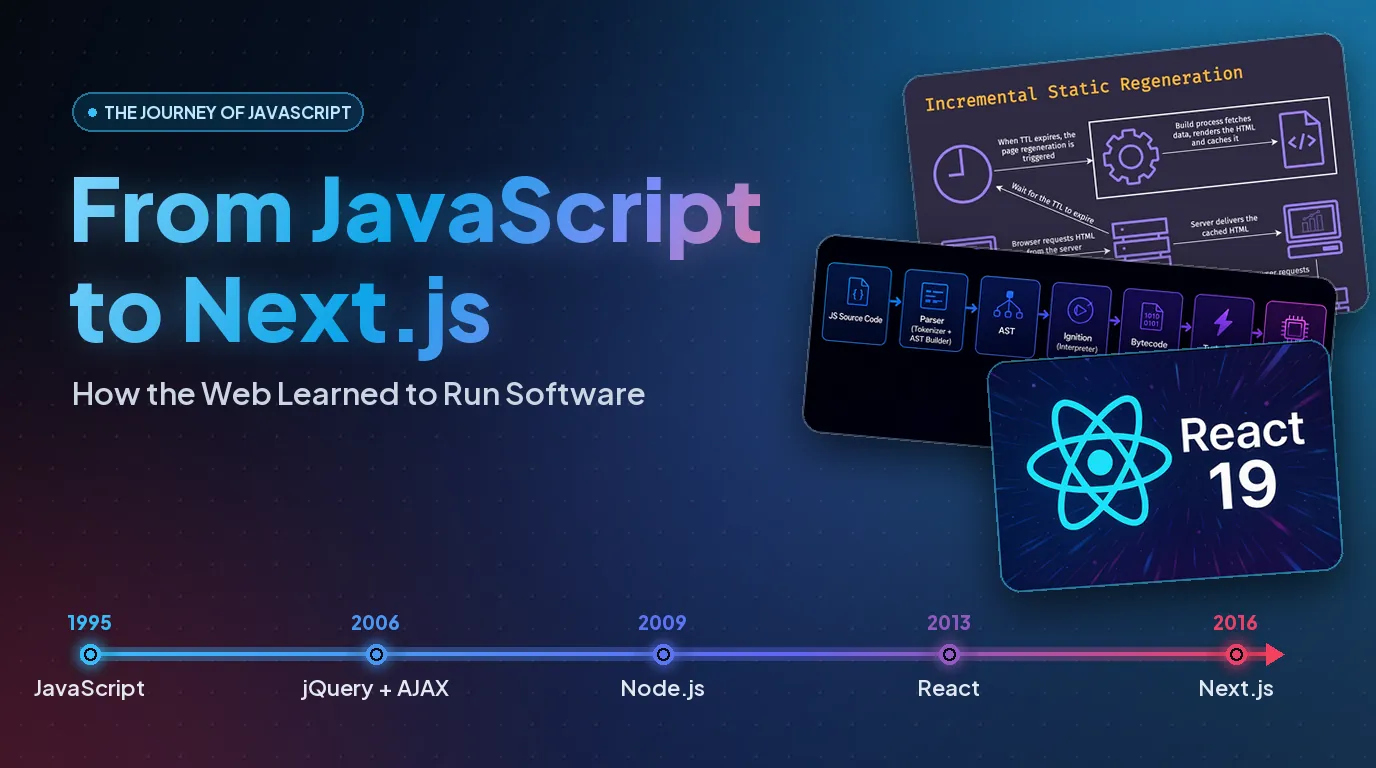
That shift did not arrive with one revolutionary release. It accumulated across decades of engineering, each layer solving a limitation that the previous layer had exposed. JavaScript made pages interactive. AJAX changed how the browser talked to the server. jQuery smoothed over the browser's rough edges. Backbone and Ember brought structure to code that had outgrown a single file. Node.js carried JavaScript out of the browser entirely. React reframed the interface as a function of data, and Next.js grew React into a framework for building whole applications.
There is a principle worth holding onto before we start, because it explains the entire arc: no technology exists in isolation. A modern application is not "a React app." It is a language, an execution engine, a set of browser APIs, a build system, a rendering strategy, a network, a database, a cloud, and - increasingly - a layer of AI, all cooperating. Each part has a job. The quality of the product depends less on any one of them than on how deliberately they are connected.
To understand where the web is now, we have to understand why each of those layers had to exist at all.
1. JavaScript: the language that made the web interactive
HTML describes documents; CSS styles them. Neither was meant to express the behavior a modern application needs. JavaScript, introduced in 1995, filled that gap. Its first purpose was humble: let a page respond to a click, validate a form before it was sent, change something on screen without a round trip to the server.
What makes JavaScript interesting is how far it travelled from that beginning. The same language now drives browser interfaces, backend services, build tools, automation, desktop apps, and server-side rendering. Very few languages have stretched so far from their origin.
Is JavaScript interpreted or compiled?
JavaScript is usually called "interpreted," but that label hides what actually happens. A modern engine blends interpretation and compilation.
Take Google's V8, the engine behind Chrome and Node.js. When it runs your code, it first parses the source into an Abstract Syntax Tree - a structured description of the program. An interpreter called Ignition turns that into bytecode and begins executing. As the engine watches which code runs often, it promotes those "hot" paths into optimized machine code through Just-In-Time (JIT) compilation, guided by runtime profiling - and will deoptimize again if its assumptions stop holding.
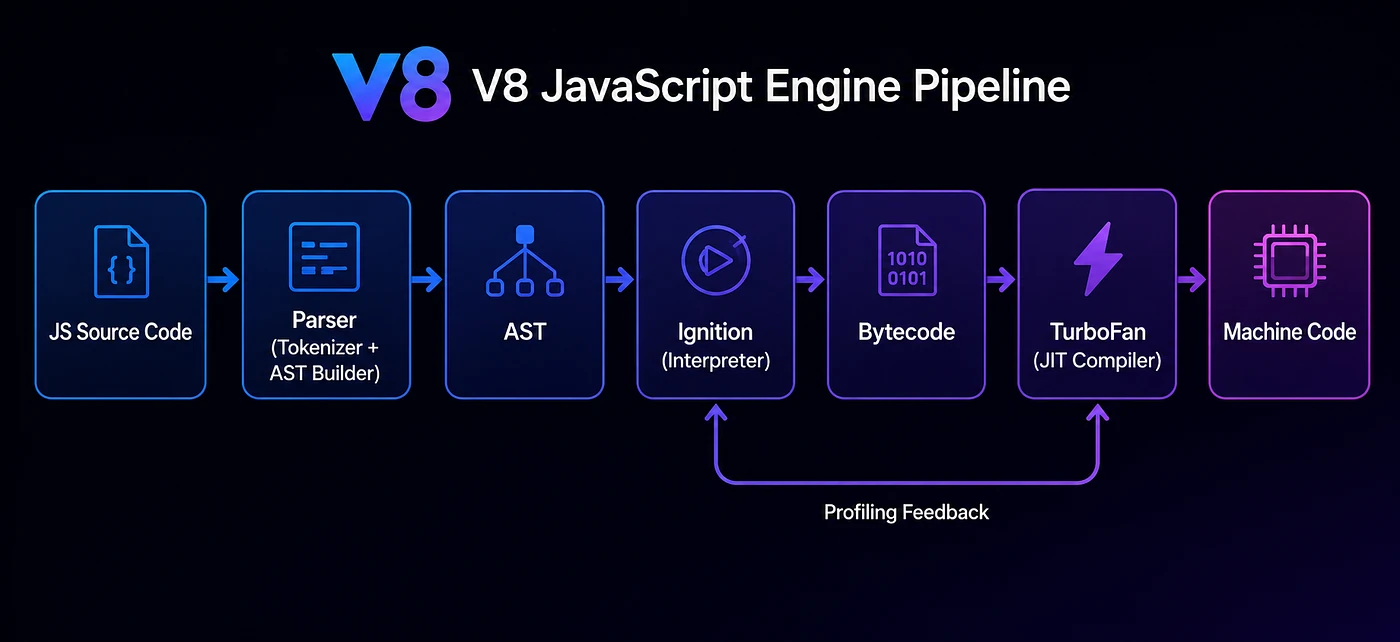
JavaScript source
      ↓
    Parsing
      ↓
Abstract Syntax Tree
      ↓
Bytecode generation
      ↓
Interpreter execution  ──▶ runtime profiling
      ↓                        ↓
Machine code  ◀────── JIT optimization / deoptimization
This is a conceptual picture, not a sequence every engine follows identically. The point is the distinction: JavaScript is a language; interpretation and compilation are implementation techniques its engines use. That blend is how JavaScript gets both fast startup and fast steady-state execution.
Why JavaScript stays backwards compatible
One of JavaScript's most consequential commitments is to not break the past. Imagine a business that shipped its website in 2012. If a new version of the language invalidated older code, that site could stop working overnight for millions of people. The cost of that would be enormous.
So the language evolves carefully, through the ECMAScript specification and the TC39 standards process. New capabilities arrive - ES2015 alone added let, const, arrow functions, classes, and modules - while existing valid programs keep working wherever practical.
Two tools are often confused here, and the difference matters. Babel transforms newer syntax into older syntax an environment can parse. Polyfills supply missing runtime APIs when a feature simply isn't present. Transforming syntax does not conjure a missing browser capability; those are two different problems with two different solutions. JavaScript's discipline about compatibility is a large part of why the web can move forward without forcing everyone to rewrite everything.
2. The browser, the DOM, and the rise of AJAX
JavaScript could run logic, but it needed a way to touch what was on screen. That is the Document Object Model: the browser represents an HTML document as a tree of objects, and JavaScript can read and change that tree - altering text, restyling elements, adding and removing nodes, responding to events.
Early on, this was unpleasant work. Browsers implemented the DOM, events, and APIs inconsistently, so developers wrote defensive, repetitive, browser-specific code. jQuery, released in 2006, gave them one consistent interface for selecting elements, handling events, animating, and making requests across those inconsistent implementations. It was a relief - but the deeper shift it rode was a change in expectation: sites should behave like applications.
AJAX made that possible. Instead of fetching a whole new HTML document for every interaction, the browser could talk to the server in the background and update just part of the page. Change a quantity in a cart, and only the total updates. AJAX is not a language or a framework - it is an approach to asynchronous browser-server communication. Despite the "X" for XML in its name, today it almost always carries JSON, and the modern Fetch API has largely replaced the old XMLHttpRequest. The lasting architectural change was subtle but profound: the interface was no longer tied to a single server-rendered page.
3. Frameworks find structure - and ideas outlive their frameworks
As applications grew, a new problem surfaced. A page with a few interactive bits is easy to manage by hand. An application with hundreds of components, several data models, authentication, routing, and intertwined state is not. Developers were manually keeping the DOM in sync with their data, and it did not scale.
A wave of libraries answered that. Backbone.js (2010) gave applications lightweight structure through models, collections, views, and routing, nudging developers to separate data from presentation. Ember.js was more opinionated, supplying conventions so teams spent less time re-deciding architecture. AngularJS brought declarative templates, dependency injection, and two-way binding; Knockout popularized observables; Dojo offered a broad toolkit.
Not all of them stayed mainstream, and that is the lesson worth keeping: technologies rarely vanish when their popularity fades - their ideas migrate into what comes next. Component organization, routing, dependency management, data binding, separation of concerns: these concepts, proven in that era of experiments, became the vocabulary React and every modern framework still speak. The evolution of the frontend was never a straight line. It was a series of experiments that revealed which ideas held up at scale.
4. Node.js: taking JavaScript beyond the browser
JavaScript was increasingly capable, but still confined to the browser's sandbox. Node.js, created by Ryan Dahl in 2009, removed that ceiling. Built on V8, it let JavaScript run on servers - reading files, opening network connections, talking to the operating system.
Its significance went past "JavaScript on the server." Node introduced an event-driven, non-blocking I/O model that made it unusually good at handling many concurrent connections.
The problem Node was answering
Traditional servers such as Apache historically handled requests with a process or a thread per client. These models worked, but each process or thread consumes memory and demands scheduling from the operating system. When thousands of connections sit idle waiting on a database or the network, keeping an army of workers busy doing nothing becomes expensive - the heart of the famous C10K problem (handling ~10,000 concurrent connections efficiently).
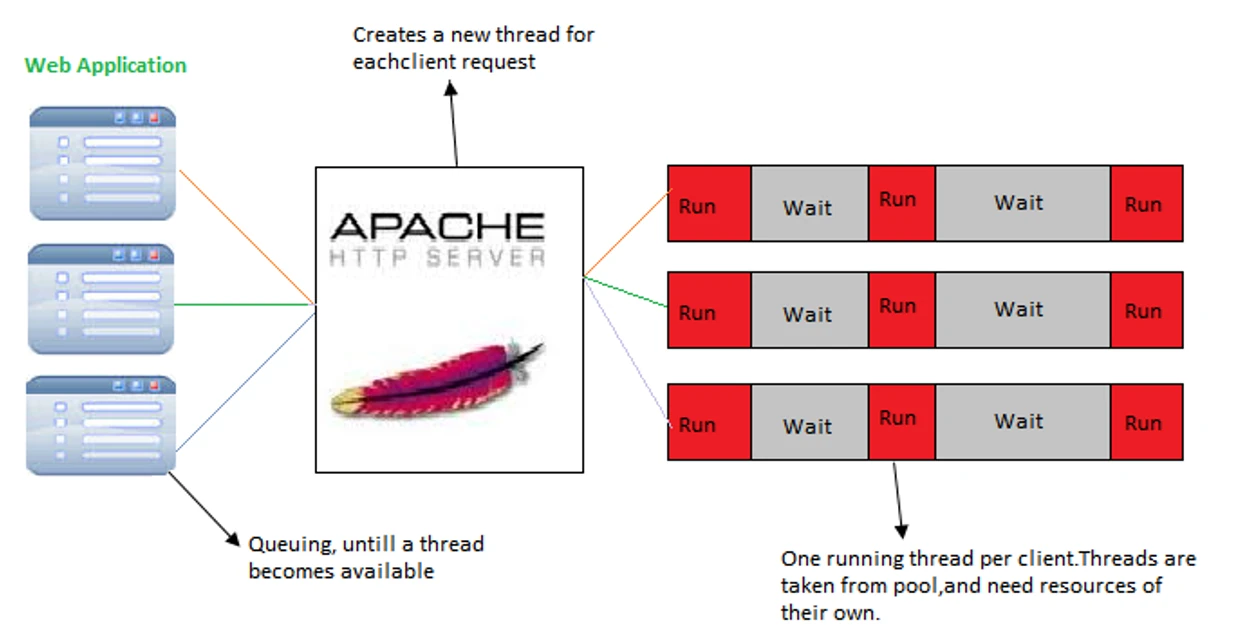
It is worth being fair to Apache here, because the history is often told carelessly. Apache was not incapable of concurrency; it evolved several Multi-Processing Modules - prefork, worker, and event - and its event MPM specifically reduced the need to tie up a worker while a connection waited. The real story was never "Apache couldn't." It was that different concurrency models carry different trade-offs in memory, complexity, and operations.
How Node approached it differently
Node built its model around non-blocking I/O. Rather than making JavaScript wait for each I/O operation to finish, Node starts the operation and moves on; when it completes, a callback is scheduled. Coordinating all of this is the event loop, and underneath it sits libuv, a cross-platform library providing asynchronous I/O, the event loop itself, timers, and a worker pool.
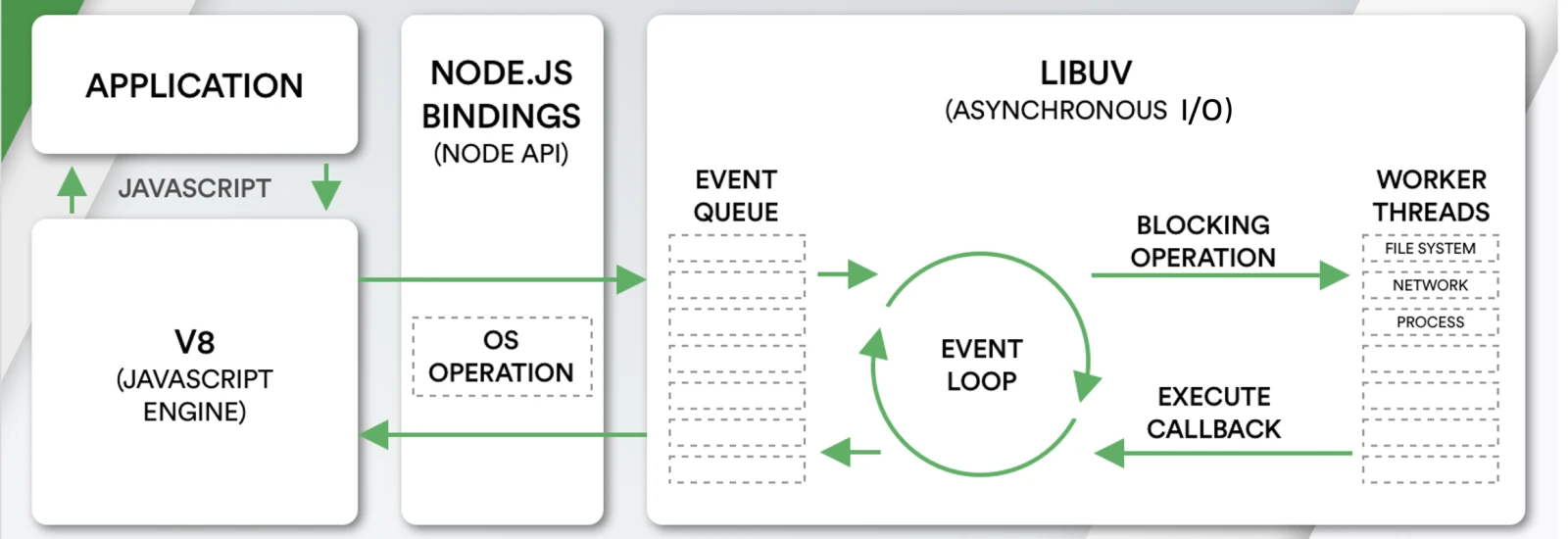
Incoming requests
      ↓
  Node.js runtime
      ↓
   Event loop ──▶ non-blocking network I/O
      │        ──▶ operating system
      │        ──▶ libuv worker pool
      ↓
Completed operations → callback execution → HTTP response
Two historical nuances deserve care, because they are routinely mangled. First, Node does not run everything on one thread - JavaScript callbacks run on the event-loop thread, but the OS and libuv's worker pool handle much of the actual I/O. Second, Node did not invent the event loop. Event-driven programming long predates it. Node's contribution was bringing an accessible JavaScript runtime and a powerful event-driven architecture together in one place.
Non-blocking I/O also has a limit that trips up newcomers: it does not make computation free. A heavy synchronous calculation inside a request handler will block the event loop and starve every other callback. That is why Node applications reach for worker threads, separate processes, and queues when work is CPU-bound. Node shines for I/O-heavy workloads, APIs, real-time systems, and tooling - not for grinding numbers on the main thread.
Finally, Node established npm, the ecosystem that let developers install and share packages instead of rebuilding everything. Bundlers, compilers, test frameworks, and frontend tooling all became reachable through one registry. React itself does not need Node to run in a browser - but Node became the engine room of the tooling and server-side execution that surrounds React and Next.js.
5. What happens before a React app reaches the browser
Here is one of the most overlooked facts in frontend engineering: a modern React application is not a pile of JavaScript files handed directly to the browser. It passes through a build pipeline first, and understanding that pipeline clears up a common misconception.
Developers write JavaScript, JSX, TypeScript, CSS, and imported modules. Browsers do not understand every one of those forms directly. So the project needs a toolchain:
Source code → module resolution → parsing (AST) →
transformation (Babel / SWC) → dependency graph →
bundling & code splitting → tree shaking →
minification → production assets → browser
The important pieces, briefly: parsing builds an AST so tools can reason about the code; transpilation (Babel, SWC) turns JSX and TypeScript into something a target can run; bundling (Webpack, Rollup, Vite) resolves dependencies into optimized output; tree shaking drops unused code; code splitting breaks the app into chunks that load on demand; minification strips what the browser doesn't need; source maps let you trace a production error back to your original code.
The tools shifted over time - Grunt and Gulp automated tasks, RequireJS and Browserify managed modules, Webpack dominated, Rollup leaned into ES Modules, and Vite made development fast using native browser modules. Modern frameworks now fold much of this in: Next.js coordinates compilation, bundling, routing, and rendering for you.
The conclusion that matters: React manages the user interface; it does not, by itself, bundle, parse, or optimize your application. Those responsibilities belong to the toolchain and the runtime. Knowing where React's job ends is the first step toward reasoning about performance honestly.
6. React - and the architecture underneath it
By the early 2010s, interfaces had become genuinely hard to keep consistent. Picture a dashboard with transactions, balances, notifications, and preferences; a single data change might need to touch several parts of the screen at once. Doing that by hand, through direct DOM manipulation, was error-prone.
React, released by Facebook in 2013, popularized a different mental model: describe the interface as a function of state, and let React figure out how to update the DOM to match. You stop issuing step-by-step instructions to the browser and start declaring what the UI should look like for the current data.
React Fiber: reconciliation and scheduling, not "a faster Virtual DOM"
This is a piece that deserves more than a passing mention, because it is where React's modern behavior actually lives. It is tempting to describe React's internals as "a fast Virtual DOM," but that undersells what Fiber - the reconciliation architecture introduced in React 16 - actually does.
Fiber is an internal reconciliation and scheduling architecture. Two ideas sit at its center. The first is the separation of the render phase from the commit phase: rendering calculates what needs to change by comparing the new description of the UI with the previous one; committing applies those changes to the host environment (the DOM). These are deliberately not the same step. The second idea is that the render phase can be broken into units of work that React can pause, resume, reprioritize, and even discard. That means an urgent update - a keystroke, say - need not wait behind a large, less urgent re-render.
Fiber is what makes capabilities like concurrent rendering, Suspense, and streaming possible. It is worth stating plainly, because the history gets tangled: Fiber is React's own scheduling architecture. It has nothing to do with Node's event loop; the two are separate developments that are often, wrongly, conflated. Fiber genuinely cannot be explained responsibly in two paragraphs - it rewards a dedicated study - but the essential shift is from "diff and patch quickly" to "schedule rendering work intelligently."
7. React 19: toward a more integrated application model
React kept evolving with the applications built on it. React 19, stable in December 2024, added capabilities that simplify patterns developers had been hand-rolling for years: Actions, useActionState, useOptimistic, useFormStatus, better form handling, and the stable release of React Server Components.
Consider a form submission. Previously you tracked several states yourself - is it submitting, did it succeed, did the server error, should the UI show an optimistic result, should the form reset. Actions fold that coordination into React:
import { useActionState } from "react";

async function updateProfile(previousState, formData) {
  try {
    await saveProfile(formData.get("name"));
    return { success: true };
  } catch {
    return { success: false };
  }
}

function ProfileForm() {
  const [state, action, pending] =
    useActionState(updateProfile, { success: false });

  return (
    <form action={action}>
      <input name="name" required />
      <button disabled={pending}>{pending ? "Saving…" : "Save"}</button>
      {state.success && <p>Profile updated.</p>}
    </form>
  );
}
One distinction is easy to blur and important to keep straight: Server Components are not the same as Server Functions (Server Actions). Server Components define where and how a component renders; Server Functions provide references to functions executed in a server environment through framework-supported mechanisms. Both rely on appropriate framework and bundler infrastructure. React 19 is less a bag of new hooks than a statement of direction: coordinating client and server responsibilities inside one coherent model.
8. Next.js and the strategies for rendering
React gives you a superb way to build interfaces. A production application needs much more: routing, discoverability, fast first loads, server-side data fetching, caching, backend integration, deployment, and performance work. You can assemble those around React yourself - but managing every piece independently is its own source of complexity.
Next.js emerged as the framework that integrates them. Its App Router uses the file system as the routing convention, treats pages and layouts as Server Components by default, and brings in Suspense, streaming, and framework-managed navigation. Client Components are introduced only where browser interactivity genuinely requires them - which keeps JavaScript off the wire when it isn't needed. Running npx create-next-app is not downloading a library; it is scaffolding an application architecture.
Next.js also makes the rendering strategy an explicit, per-route decision rather than a global default:
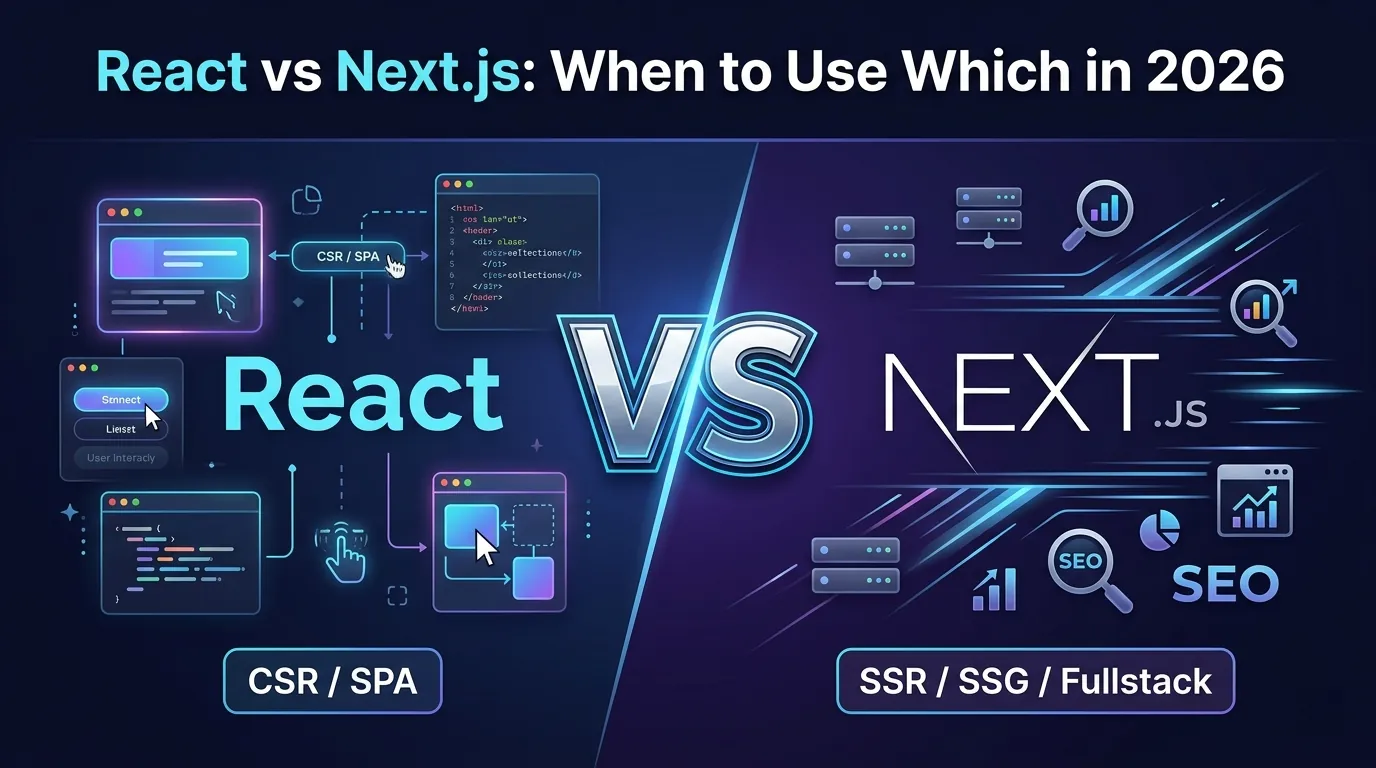
| Strategy | Where rendering happens | Typical use |
| CSR - client-side | In the browser | Highly interactive dashboards |
| SSR - server-side | On the server, per request | Personalized or fast-changing pages |
| SSG - static generation | At build time | Blogs, marketing pages |
| ISR - incremental static regeneration | Build time, revalidated later | Product catalogs, content platforms |
| Streaming | Progressive server delivery | Complex pages with independent sections |
These are not mutually exclusive. A single application mixes them per route and even per component. And the architectural point is the one that outlasts any framework version: the goal is never to pick the newest rendering technique - it is to pick the strategy that best serves the data, the user experience, and the business requirement.
9. Findable, fast, and installable
A technically excellent application is not automatically a discoverable one. Search engines have to find URLs, crawl them, understand the content, and decide what to index. Plain HTML sites handed over their content directly; JavaScript-heavy applications added a wrinkle, because meaningful content could depend on JavaScript running first. Modern crawlers can execute JavaScript, but that does not retire sound technical SEO - metadata, canonical URLs, sitemaps, robots directives, structured data, and server-rendered content, all of which Next.js helps manage. Core Web Vitals matter too: Largest Contentful Paint for loading, Interaction to Next Paint for responsiveness, Cumulative Layout Shift for visual stability. But none of it rescues weak content - a fast site with poor information architecture is still a poor site.
The same web platform can also reach toward native-like experiences. Progressive Web Applications combine a Web App Manifest (identity, icons, display behavior), Service Workers (which run apart from the page to intercept requests, cache, and enable offline use), and push notifications where supported - an efficient way to distribute broadly without a separate native app per platform. They are not a universal replacement for native, though: hardware integration, background execution, and platform support still decide the right call.
10. The architecture behind a production-ready application
Building an interface is one part of engineering a reliable product. The harder questions begin elsewhere: what happens when thousands of users arrive at once, when the database is briefly unavailable, when an external API fails, when a business process must run without a human watching.
Data comes first. How information is modeled shapes everything downstream - an inefficient query becomes a bottleneck no amount of frontend polish can hide. Relational versus non-relational models, normalization, indexing, consistency, transactions, access patterns: these are decisions, not defaults. The aim is not to choose a database because it is popular, but to choose an architecture that matches how the application actually uses its data.
Then infrastructure. Modern applications lean on the cloud - virtual machines and containers, managed databases, object storage, CDNs, load balancers, serverless functions, message queues, monitoring, and automated deployment pipelines. A CDN cuts latency by serving assets closer to users; a load balancer spreads traffic; a queue decouples background work from the request a user is waiting on.
Here is a distinction that separates a working deployment from an engineered one: cloud hosting is not cloud architecture. Putting an application on a cloud provider does not make it cloud-native, scalable, or resilient. Those properties come from deliberate decisions about availability, security boundaries, cost, performance, and operational reliability - not from the logo on the invoice.
11. AI is changing the engineer's role - not removing it
The most significant recent shift is the rise of AI in the engineering workflow. AI tools can generate code, explain unfamiliar implementations, surface likely bugs, draft tests, and write documentation. But the larger opportunity is not faster typing.
Software engineering has always been the translation of a business problem into a technical system: understanding workflows, finding constraints, designing data structures, weighing architectural alternatives, anticipating what the business will need next. AI can genuinely assist across that span - exploring alternative architectures, stress-testing assumptions during system design, evaluating indexing and query strategies, proposing component structures and accessibility improvements, generating test cases and edge conditions. Used well, it lets engineers spend more time on the client's actual problem and less on repetitive implementation.
It comes with a hard boundary, though, and this is where discipline matters most. AI-generated code is not, by itself, engineered software. These systems can produce incorrect or insecure implementations, misunderstand a requirement, add needless complexity, and - used carelessly - leak confidential information. Responsible adoption therefore depends on controlled tools, data governance, human review, testing, security validation, and clear accountability. AI should assist engineering judgment, never replace it. The same holds for any technology: dropping AI or the cloud into an application does not automatically make it intelligent or valuable - its worth depends on whether it solves a real problem inside the larger architecture. For regulated or sensitive domains the stakes rise, and no one should imply a certification they cannot evidence.
Which points at a quiet philosophy running through this whole history. The value of building software has never been measured by how much code gets produced, but by the quality, security, reliability, and business value of what is delivered. A client arrives with a business problem; the work is to translate it into a well-designed system - not to start typing components. An application should not merely work. It should be architected to keep working, reliably and securely, as the business it serves evolves.
Conclusion: developed, or engineered?
The journey from JavaScript to Next.js is really a journey through the evolution of software engineering itself. Every major technology appeared because an older approach hit a limit, a new requirement emerged, or someone found a better way to organize complexity. jQuery smoothed the browser. Backbone and Ember introduced structure. Node carried JavaScript past the browser. React changed how we think about interfaces. Next.js gathered up what production applications actually need. The cloud reshaped how software is deployed and scaled, and AI is reshaping how engineers analyze, build, and optimize.
Recall where we began: no technology exists in isolation. JavaScript is the language; Node is a runtime; React is an approach to interfaces; Next.js is an application framework; databases hold the information; the cloud carries the load; AI assists the thinking. None of them, alone, guarantees a good product. A scalable application needs sound data architecture. A secure one needs deliberate boundaries. A fast one needs real performance engineering. A beautiful interface still has to be accessible, responsive, and consistent.
So the lesson is not to adopt tools because they are popular, but to understand them, evaluate them, and choose them for the problem in front of you. Good software is developed. Great software is engineered. The difference is made in the decisions taken long before the first line of code - and in the discipline held long after the application goes live.
References and further reading
- MDN - JavaScript technologies overview
- ECMAScript Language Specification (TC39)
- V8 - the Ignition interpreter
- Node.js - the event loop, timers, and process.nextTick
- Node.js - Don't block the event loop
- libuv - design and architecture
- React - Render and commit
- React 19 - official release notes (December 5, 2024)
- Next.js - App Router documentation
- Next.js - Server and Client Components
- Apache HTTP Server - Multi-Processing Modules
- Backbone.js and Ember.js - official documentation