Most Laravel developers think of themselves as PHP developers. But open any modern Laravel project and you will find a package.json file and a node_modules folder with hundreds of JavaScript packages. Vite, Vue or React, Tailwind, Axios and their dependencies all come from npm. Every time you run npm install, you are trusting code written by thousands of people you have never met.
In 2026, attackers have started taking advantage of that trust at scale. Instead of hacking your server, they hack a popular npm package and wait for you to install it. The malicious code then steals your .env file, cloud keys and CI/CD tokens, often before your app even builds.
This blog explains how these attacks work and walks through the exact setup we now use on client projects to block them. It is written for Laravel and full-stack developers, tech leads, and agency teams who ship Vue or React front ends. If you run npm install anywhere in your pipeline, this is for you.
The Problem: Your Build Pipeline Is the New Attack Surface
What happened in 2026
This year has been one of the worst on record for the npm ecosystem. In March 2026, the hugely popular Axios library was compromised, a package that sits in almost every Vue and React project. In May, the "Mini Shai-Hulud" campaign compromised hundreds of package versions in the @antv data-visualisation ecosystem. Security researchers also saw the first self-spreading "worms": malware that uses stolen npm tokens to publish infected versions of even more packages.
The problem became serious enough that GitHub announced breaking changes for npm version 12, including disabling install scripts by default.
How a typical attack works
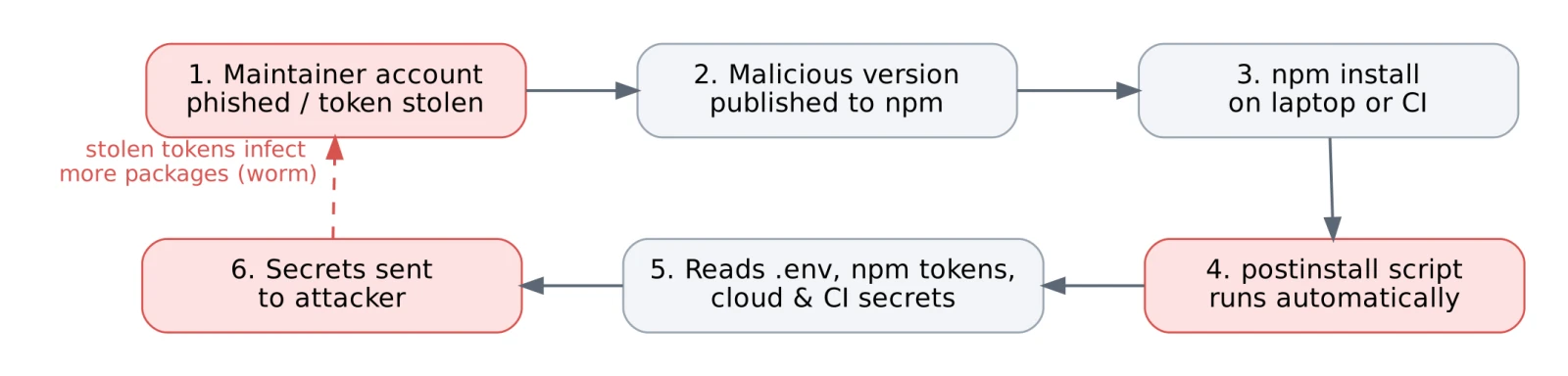
The key detail is step 4. npm packages can define a postinstall script that runs automatically during installation. You never call it, and you never see it. If that script is malicious, it runs with the same access as your terminal or CI job, so it can read everything in your environment.
Real-world scenario
Imagine a typical client project: a Laravel 11 back end, a Vue 3 admin panel built with Vite, and a GitHub Actions pipeline that deploys to AWS. The CI job checks out the code, copies a full .env file (with database, Stripe and AWS keys), runs npm install, builds the assets and deploys.
If one package in that tree is compromised, the attacker gets payment keys, database credentials and cloud access in a single run.
Business impact
- Data breach risk: stolen database or cloud keys can expose customer data.
- Financial loss: leaked payment or AWS keys can be abused within hours.
- Client trust: for an agency, one incident can cost a long-term client relationship.
Technical challenges
- A project usually has 500 to 1,500 transitive packages, far too many to review by hand.
- A malicious version can be published and pulled into builds within minutes.
- Many teams use npm install instead of npm ci, so versions change silently between builds.
- Build jobs often have far more secrets than they actually need.
The Solution: Four Layers of Defence
No single setting stops every attack. Instead, we use four simple layers. Each one blocks a different step of the attack chain, so an attacker has to beat all of them.
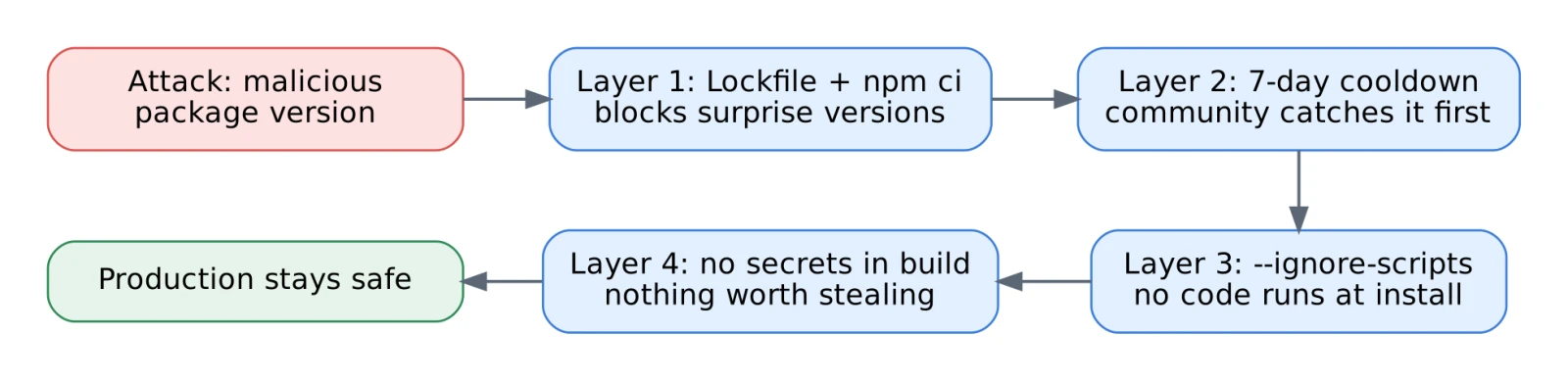
Layer 1: Lock versions with package-lock.json and npm ci
Always commit package-lock.json. In CI, use npm ci instead of npm install. npm ci installs exactly what is in the lockfile and fails if package.json and the lockfile disagree. A new malicious version cannot slip in unless someone deliberately updates the lockfile in a reviewed pull request.
# CI: install exactly what was reviewed
npm ci --ignore-scripts
Layer 2: Add a cooldown before accepting new versions
Most malicious versions are found and removed within a few days. If you simply wait before upgrading, the community catches most attacks for you. We use Renovate with a seven-day minimum release age:
// renovate.json
{
  "extends": ["config:recommended"],
  "minimumReleaseAge": "7 days",
  "packageRules": [
    { "matchUpdateTypes": ["major"], "dependencyDashboardApproval": true }
  ]
}
Layer 3: Turn off install scripts
This is the most effective single change. Add an .npmrc file to the project root so no package can run code during installation:
# .npmrc
ignore-scripts=true
A few packages genuinely need their scripts (for example native image tools like sharp). Rebuild only those, by name, after install:
npm ci
npm rebuild sharp esbuild   # explicit allowlist
This turns "every package can run code" into "only the packages we approved can run code".
Layer 4: Keep secrets out of the build job
A Vite build only needs public VITE_* variables. It does not need your database password or Stripe secret. We split the pipeline into a build job with no secrets and a deploy job that holds them. The production server never runs npm at all; it receives the compiled public/build folder.
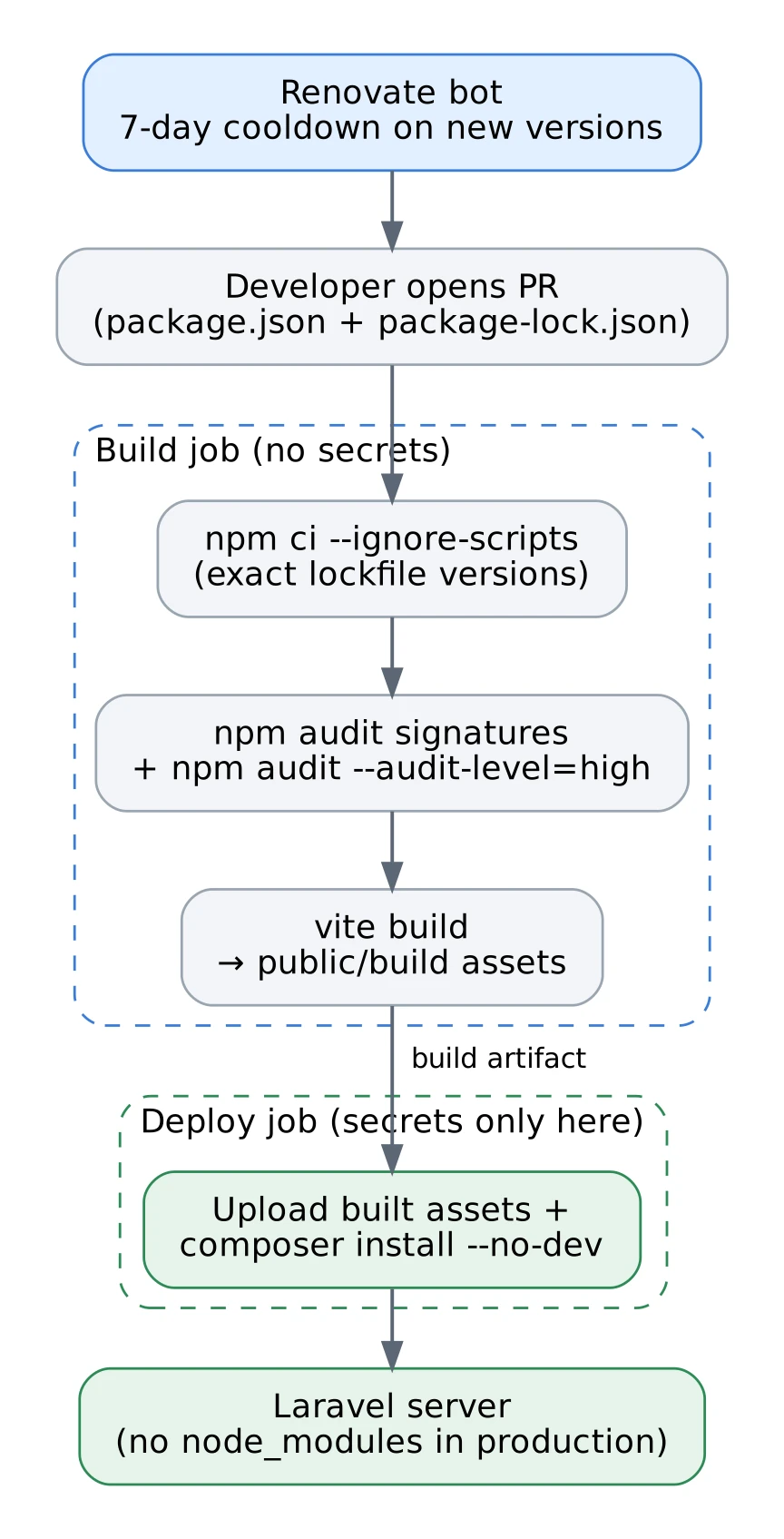
# .github/workflows/deploy.yml (simplified)
jobs:
  build:
    runs-on: ubuntu-latest        # no secrets attached to this job
    steps:
      - uses: actions/checkout@v4
      - uses: actions/setup-node@v4
        with: { node-version: 22, cache: npm }
      - run: npm ci --ignore-scripts
      - run: npm audit signatures
      - run: npm audit --audit-level=high
      - run: npm run build
      - uses: actions/upload-artifact@v4
        with: { name: assets, path: public/build }
  deploy:
    needs: build
    environment: production       # secrets live only here
    steps:
      - uses: actions/download-artifact@v4
      # rsync assets + composer install --no-dev on the server
Key decisions
- No Node.js on production servers. Fewer tools on the server means fewer things to attack.
- Separate npm publish tokens. Developers who publish internal packages use granular, short-lived tokens with two-factor authentication.
- Audit as a gate, not a report. High-severity findings fail the build instead of creating a warning nobody reads.
Real Experience: What We Learned in Production
Mistake 1: Running npm install on the production server
On one older client project, the deploy script SSHed into the server and ran npm install && npm run build. Because it used npm install, the lockfile was ignored for some packages, and the production build used different versions from the ones we had tested. We once spent half a day chasing a Vue component bug that existed only in production. Moving the build into CI with npm ci fixed both the drift and the security risk.
Mistake 2: ignore-scripts broke our tooling on day one
When we first added ignore-scripts=true, two things broke: Husky git hooks stopped installing, and an image-processing package failed at runtime. The fix was simple: an explicit npm rebuild list in CI, and a one-line npm run prepare step in our onboarding README for local Husky setup. Lesson: roll this out on a branch first and test a full build.
Mistake 3: The build job could see nine secrets
During an audit we found that our build job had the full production .env, with nine secrets, including AWS and Stripe keys. None of them were needed to compile front-end assets. After the split, npm install runs with zero production secrets in the environment. Even if a malicious package slipped through, there would be nothing valuable to steal.
Performance optimization: security made us faster
We expected these changes to slow things down. The opposite happened. npm ci with dependency caching is faster than npm install, and skipping install scripts removes extra work. Here are the numbers from one client project:
| Metric | Before | After | Change |
| CI front-end build time | 4 min 10 s | 1 min 50 s | −56% |
| Full deploy time | ~6 min | ~2.5 min | −58% |
| Secrets visible to npm install | 9 | 0 | −100% |
| Untracked dependency version changes | Every deploy | None | Eliminated |
Quick Checklist
- Commit package-lock.json and use npm ci in every pipeline.
- Add ignore-scripts=true to .npmrc and allowlist packages with npm rebuild.
- Set a 7-day cooldown on dependency updates with Renovate.
- Remove all production secrets from the build job.
- Never run npm on production servers; deploy compiled assets only.
- Run npm audit signatures and fail builds on high-severity findings.
- Enable two-factor authentication and granular tokens for anyone who publishes packages.
Conclusion
npm supply-chain attacks are not a future risk; they happened again and again in 2026. The good news is that you do not need expensive tools to defend against them. A lockfile, a cooldown, disabled install scripts and a secret-free build job block most real-world attacks, and as our numbers show, they can even make your pipeline faster.
Key takeaway: treat npm install as running untrusted code, because that is exactly what it is.
If your team runs Laravel, Vue or React projects and you are not sure how exposed your pipeline is, we can help. Our web development services team builds and audits Laravel applications, and our DevOps and CI/CD services can harden your build and deployment pipeline. A secure pipeline protects your customer data, your cloud bill and your reputation.