If you've been building with Claude Code, you already know how powerful it is - the ability to let an AI agent write, debug, and refactor entire codebases is a genuine productivity multiplier. But there's one painful catch: every token costs money. For developers and teams running long coding sessions, API bills can spiral fast.
In 2026, with Ollama making it trivially easy to run large language models on your own hardware, there's a smarter path. You can connect Claude Code to a locally hosted model through Ollama's OpenAI-compatible API endpoint - getting the full Claude Code experience with zero API cost and unlimited usage.
The Problem: Great Tool, Growing Bills
Imagine a typical day: you open Claude Code in the morning, ask it to refactor a legacy PHP module, run a few debugging sessions, then use it to generate unit tests. By the time you close your laptop, you've burned through 200k-400k tokens without even noticing. At standard API pricing, that's real money - every single day.
For individuals and small teams, the cost issue shows up in several ways:
- You start self-censoring prompts to save tokens - which defeats the purpose of having an AI assistant.
- Long agentic tasks (like letting Claude Code autonomously fix a bug across 10 files) become expensive to run freely.
- Teams hit rate limits during peak hours, breaking development flow.
- There's a constant mental overhead of "how much is this session costing me?"
The good news is Claude Code supports custom API base URLs and model overrides. Models like Qwen2.5-Coder-32B, DeepSeek-Coder-V2, and Mistral-based code models running locally via Ollama are now genuinely capable for day-to-day coding tasks.
Architecture Overview
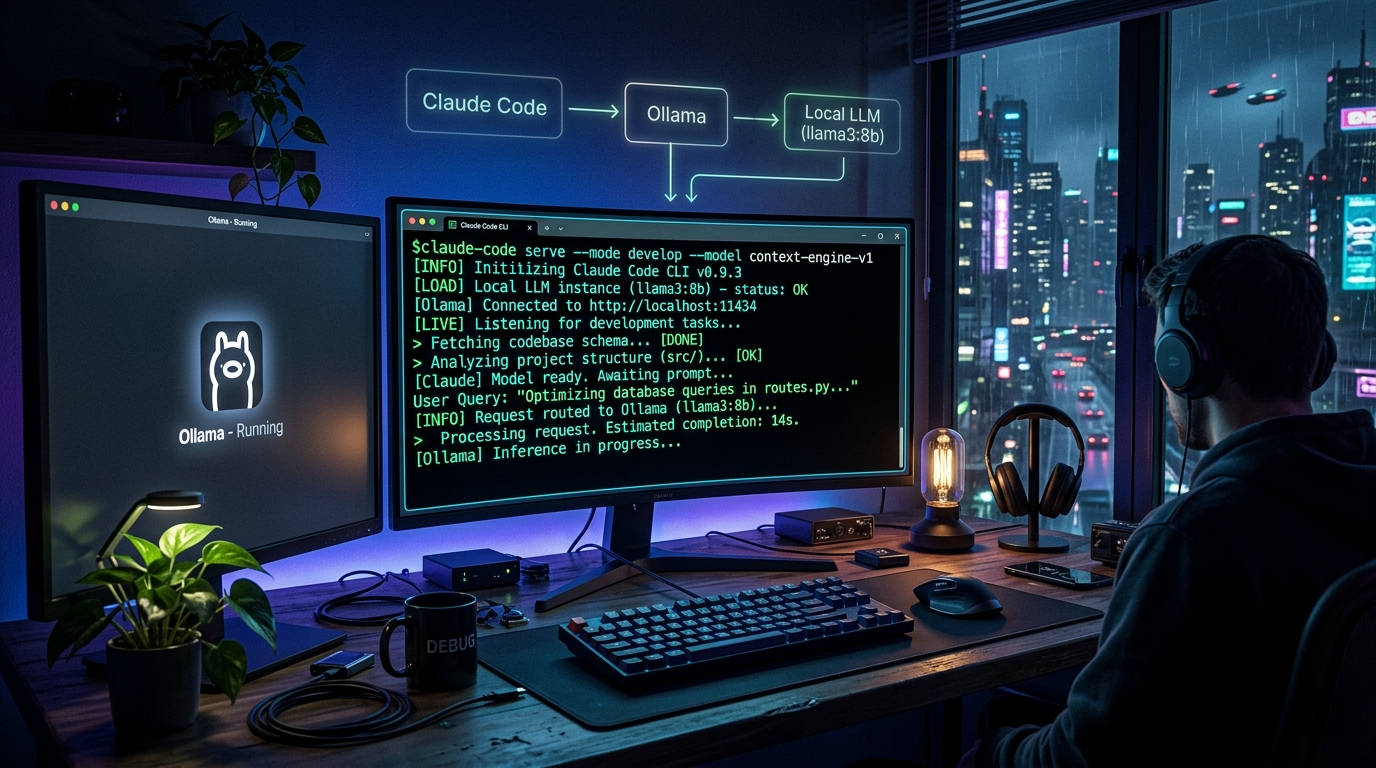
The architecture is straightforward. Ollama runs a local HTTP server that exposes an OpenAI-compatible API at http://localhost:11434. Claude Code, which uses the Anthropic SDK under the hood, can be redirected to any OpenAI-compatible endpoint using environment variables. Your code never leaves your machine.
Claude Code CLI
      ↓ (ANTHROPIC_BASE_URL override)
Ollama HTTP Server (localhost:11434)
      ↓ (routes request to loaded model)
Local LLM (e.g. qwen2.5-coder:32b)
Step-by-Step Setup
Step 1: Install Ollama
Download and install Ollama from ollama.com. On macOS and Linux, a single shell command handles the full setup:
# macOS / Linux
curl -fsSL https://ollama.com/install.sh | sh

# Windows: download installer from https://ollama.com/download
Step 2: Pull a Coding Model
Pull a model optimized for code. We recommend qwen2.5-coder:32b for best results, or the 7b version if you're on a machine with less than 16GB VRAM:
# Best quality (needs ~20GB VRAM or 32GB RAM)
ollama pull qwen2.5-coder:32b

# Lighter option (runs on 8GB VRAM)
ollama pull qwen2.5-coder:7b

# Verify the model is running
ollama run qwen2.5-coder:7b
Step 3: Install Claude Code
npm install -g @anthropic-ai/claude-codeStep 4: Configure Environment Variables
Add these to your shell profile (.bashrc, .zshrc, or equivalent):
# Point Claude Code to Ollama's OpenAI-compatible endpoint
export ANTHROPIC_BASE_URL="http://localhost:11434/v1"

# Set a dummy API key (Ollama doesn't require auth)
export ANTHROPIC_API_KEY="ollama"

# Specify the model to use
export ANTHROPIC_MODEL="qwen2.5-coder:32b"

source ~/.zshrc
Step 5: Launch Claude Code
cd /your/project
claude
Claude Code will start up and route all requests to your local Ollama model. You get the same interface and workflow - just without any API costs.
Real Experience: Lessons From Using This in Production
Lesson 1: Context Window Is Your Biggest Constraint
The first real production issue we hit was context window exhaustion on large codebases. When Claude Code tries to read multiple files for context, local models with 8k-16k context windows start dropping information mid-task. We solved this by switching to qwen2.5-coder:32b (128k context) and being explicit in our prompts about which files are relevant.
Lesson 2: Ollama's Default Timeout Will Break Long Tasks
Claude Code's agentic mode generates very long responses. Ollama's default request timeout of 5 minutes caused failures on complex generation tasks. Fix it with:
export OLLAMA_REQUEST_TIMEOUT=600Lesson 3: Performance Benchmark - Local vs Cloud
Here's an honest performance comparison from real usage on a mid-range MacBook Pro M3 (36GB RAM):
| Task | Claude Sonnet 4 (API) | Qwen2.5-Coder:32b (Local) |
|---|---|---|
| Simple function (50 lines) | ~2 sec | ~4 sec |
| Refactor module (300 lines) | ~8 sec | ~22 sec |
| Generate unit tests (10 tests) | ~6 sec | ~18 sec |
| Fix multi-file bug | ~15 sec | ~45 sec |
| Cost per session (2 hrs) | $3-8 | $0 |
The local setup is ~2.5x slower on average - but completely free. Our team now uses local Ollama for exploratory coding and prototyping, and reserves the real Anthropic API for client-facing work and time-sensitive debugging sessions.
Lesson 4: Not All Tasks Are Equal
Local models work best for:
- Writing boilerplate and CRUD code
- Generating test cases
- Refactoring small-to-medium functions
- Documentation and code comments
- Debugging with clear error messages
They struggle more with highly nuanced architectural decisions across large codebases and tasks requiring very recent library knowledge.
Conclusion
Running Claude Code with Ollama locally is one of the highest-leverage developer productivity moves you can make in 2026. The setup takes under 15 minutes, costs nothing ongoing, and gives you unlimited AI-assisted coding without rate limits or API bills.
The real win is behavioral: when AI assistance is free and instant, you stop second-guessing whether to use it. You ask for help more often, iterate faster, and build better software.
Need help integrating AI into your development workflow? At Logic Providers, we specialise in AI integrations and workflow automation for development teams. Whether you need help setting up local AI infrastructure, integrating LLM APIs into your product, or building custom AI-powered tools - we can help.