Access control is one of those things that feels solved until it is not. You add an isAdmin flag to your users table, check it in a few places, ship it - and for a while, that is fine. Then the product grows. You need editors who can publish but not delete. Managers who can see reports but not touch billing. Support staff who need read access to user accounts but must not see payment data. And suddenly your boolean is doing work it was never designed for, and the codebase is full of nested if-statements that nobody can explain anymore.
I have watched this happen on three different projects. The pattern is always the same: access control starts simple, gets complicated through a series of "just this once" decisions, and eventually becomes a liability that slows down every new feature. Retrofitting a proper RBAC system after the fact is painful - not impossible, but the kind of painful where you estimate two weeks and it takes six.
The Problem With "Good Enough" Access Control
Most web apps start with two types of users: regular users and admins. For an early-stage product, this is completely rational. Then growth happens. A client asks for a "manager" role. An enterprise deal requires audit-only access for their compliance team. A contractor needs temporary write access to one specific module.
The original two-role model starts getting duct-taped. New columns appear on the users table. Permissions get hardcoded into controllers. The logic inside helper methods slowly becomes an archaeology project.
Messy access control is not just a code quality problem. When permissions are scattered across the codebase with no central source of truth, things fall through the cracks. A new endpoint gets built without the right checks. A role gets expanded and nobody notices it also grants access to something unrelated. A fired employee's account gets deactivated but their API tokens - which had different permission logic - keep working.
What RBAC Actually Is
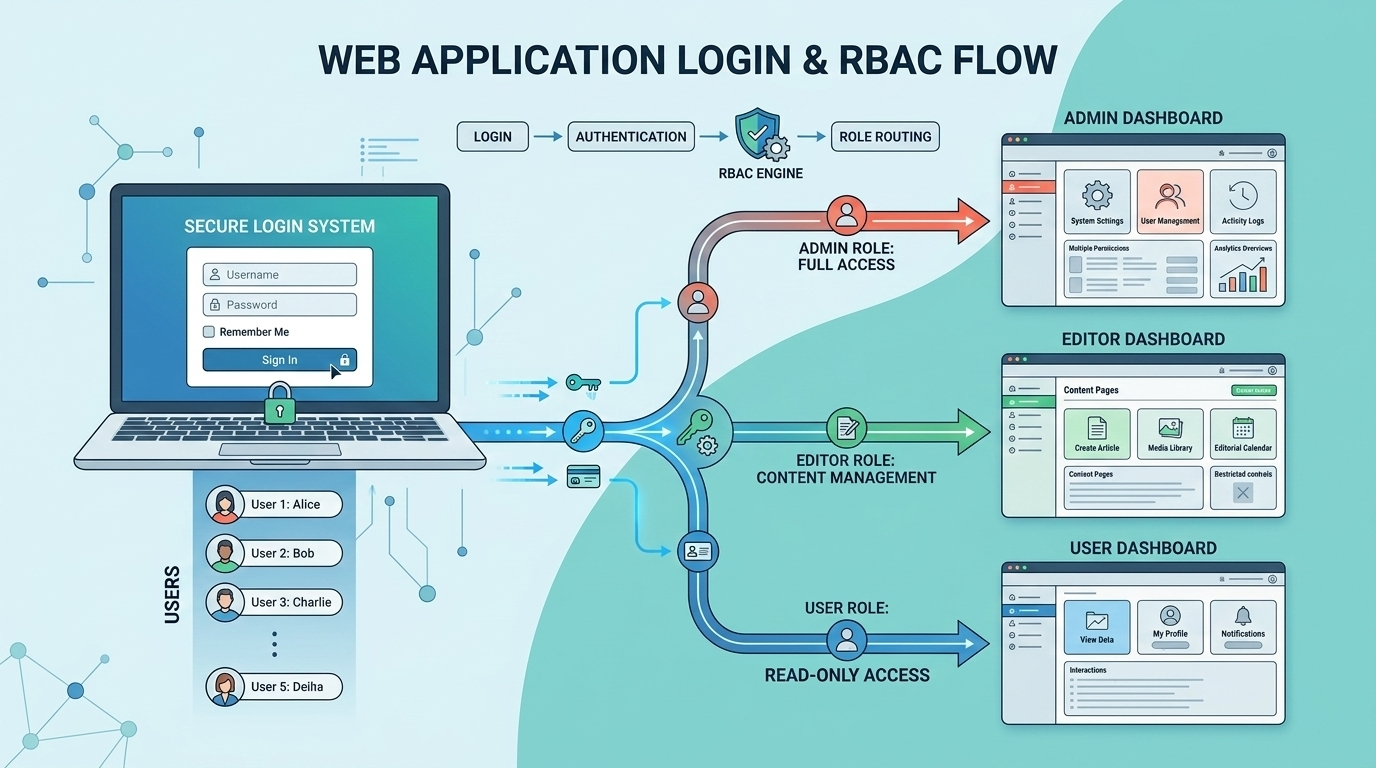
Role-Based Access Control is the idea that permissions are assigned to roles, and roles are assigned to users - not permissions directly to users. That one layer of indirection is the whole thing.
When a new employee joins as a content editor, you assign them the "editor" role. That role already has the right permissions defined. No one-off grants, no special flags. When they get promoted, you change the role. When they leave, you remove the role. Clean. Auditable. Consistent.
RBAC sits between ACL (direct user-to-permission mapping) and ABAC (attribute-based decisions) in terms of complexity - more flexible than a simple ACL, less complex than full ABAC. For most web applications, it is the right tradeoff.
Implementing It in Laravel
The Data Model
The data model is where most implementations go wrong - either too rigid or too flexible. A solid schema includes:
- roles table - with name, guard_name, and description
- permissions table - with name (e.g.,
posts:publish), guard_name, and module grouping - role_permissions pivot table
- user_roles table - with tenant_id (for multi-tenancy), expires_at (for time-limited access), and assigned_by
The expires_at on the role assignment - not on the role definition itself - gives you time-limited access without any extra tables.
Use Spatie - Do Not Roll Your Own
If you are on Laravel, use Spatie's laravel-permission package. I know it is tempting to roll your own - the concept seems simple enough. Do not. The package handles cache invalidation correctly (which is easy to get wrong), supports multiple guards, has solid test coverage, and the community has worked through most of the edge cases you will eventually hit. Two days of custom implementation versus five minutes of composer install is not a close call.
Protecting Routes and Controllers
Permission checks belong in two places: at the route/middleware level for coarse-grained access (is this user allowed to reach this part of the app at all?), and at the policy level for fine-grained decisions (can this specific user act on this specific record?). For anything more complex than a basic role check, use Laravel Policies - they group all authorization logic for a specific model in one place, eliminating scattered if-checks across controllers.
What Actually Goes Wrong in Production
The Super-Admin Bypass That Is Not a Bypass
Almost every app has a super-admin role that skips all permission checks. The problem comes when the bypass is implemented inconsistently - it works in 80% of places, but three endpoints check permissions directly without going through the Policy layer, and those three do not know about the bypass.
The fix: add a before() hook to the base Policy class in AuthServiceProvider that applies universally - then audit the whole codebase to find every non-policy permission check.
Permission Caching - The Gotcha That Wastes Hours
Spatie's package caches roles and permissions for performance. When you update a user's roles in the database during testing or through a CLI script, the cached version is still active in memory. Changes do not reflect until the cache is cleared. The symptom - a permission change that "is not working" - is confusing the first time you hit it.
The fix is one line: call forgetCachedPermissions() after any programmatic role or permission change. In queue jobs that check permissions, refresh the cache and reload the user at the start of every job.
Wildcard Permissions and Why They Backfire
Some teams define permissions like posts.* thinking it is a clean shorthand. When you add a new permission under that namespace, existing roles automatically inherit it. That is almost never what you want.
We inherited a codebase where the senior editor role had content.*. When the team added content.bulk_delete for a new feature, senior editors suddenly had bulk delete access. Nobody caught it until a staging incident. Use explicit permissions only - the verbosity is the point.
The Missing Audit Trail
RBAC tells you what a user can do. It does not automatically tell you what they did do, or who changed their permissions, or when. For most applications, that audit trail is not optional - it is a compliance requirement, a debugging necessity, and occasionally the thing that saves you during an incident post-mortem. Build it from day one.
Multi-Tenancy and Role Scoping
If your application serves multiple organisations, roles need to be tenant-scoped. A user who is an admin for Company A should not have admin permissions for Company B. Tenant context needs to be explicit in every permission check - not ambient. It is usually correct in HTTP requests. But during API requests, background jobs, imports, and cross-tenant admin actions, the session context either does not exist or is wrong.
Before You Close This Tab
If you are starting fresh, the investment in a proper RBAC system from day one is genuinely small. A few hours to set up the schema, configure Spatie, seed your initial roles, and wrap your routes with the right middleware. The return on that investment scales with your application.
Either way: explicit permissions over wildcards, audit trail from day one, tenant scoping if you have multi-tenancy, and never rely on ambient context for security decisions. Those four things will save you from the majority of production incidents that RBAC implementations tend to produce.