It is Monday morning. Your support inbox has 1,200 unread tickets. Half of them ask the same five questions. Your team spends the first three hours just sorting, tagging and routing them before anyone actually solves a problem.
Most companies tried to fix this with a single chatbot. It worked for simple FAQs, then broke the moment a customer asked something that needed two steps: check the order, then process a refund.
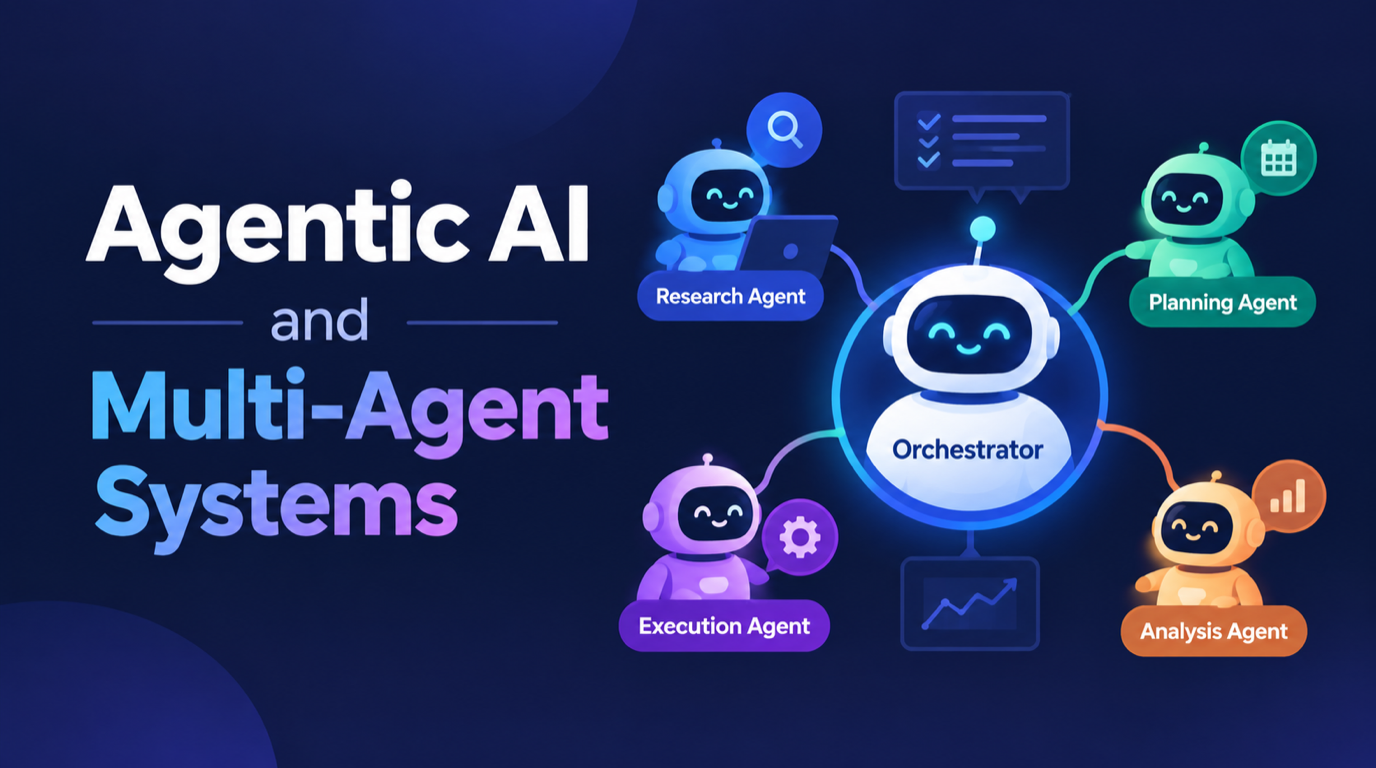
This is the problem agentic AI solves. Instead of one AI that only answers, you build a small team of AI agents. Each agent has one job, its own tools, and the ability to take action. A supervisor agent decides who does what.
Why it matters in 2026: AI is no longer a side experiment. Gartner lists multi-agent systems among its top strategic technology trends for 2026, and businesses now expect AI to complete tasks, not just chat.
Who should read this: developers, tech leads and CTOs who want to move from "we have a chatbot" to "AI handles real work in production". You will get the architecture, the code, and the mistakes worth avoiding so you can skip them.
What Is Agentic AI? (In Plain English)
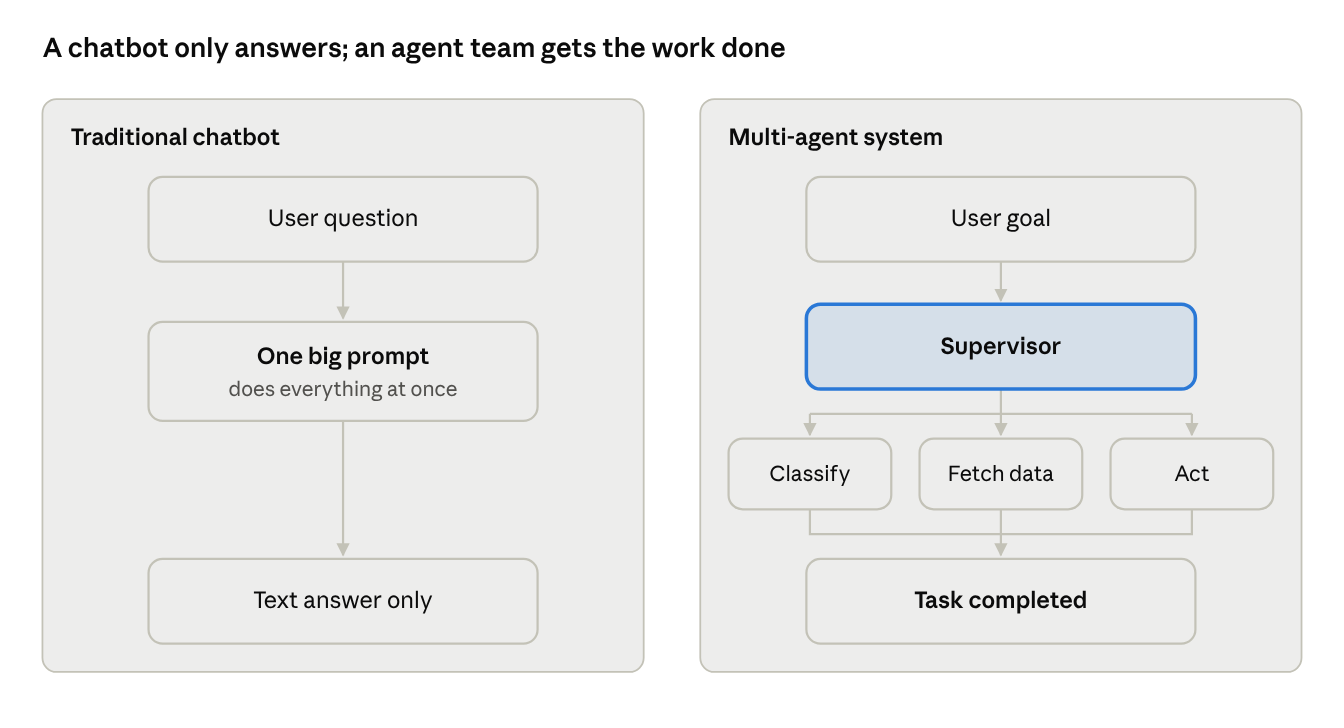
A normal AI model answers a question and stops. An AI agent gets a goal, plans the steps, uses tools (APIs, databases, search), checks the result, and keeps going until the job is done.
A multi-agent system is a group of these agents working together, like a small team. One agent reads and classifies the request. Another looks up data. Another takes action. A supervisor coordinates them.
| Traditional chatbot | Single AI agent | Multi-agent system | |
| What it does | Answers questions | Completes one task with tools | Completes multi-step workflows |
| Takes actions | No | Yes | Yes, in parallel |
| Handles complex requests | Poorly | Sometimes | Well |
| Easy to debug | Yes | Medium | Yes, if each agent is small |
The big idea: small, focused agents beat one giant prompt. Just like in a real team, a specialist does better work than one person trying to do everything.
The Problem: A Real-World Support Scenario
Let us take a mid-size e-commerce business. It receives around 1,500 support tickets a day by email and chat. Every ticket goes through the same manual routine:
- A support agent reads the ticket and figures out what the customer wants.
- They open the order system to check the order status.
- They check the refund or return policy.
- They write a reply, or escalate to a senior team member.
Business impact
- Slow responses: the average first reply takes several hours, and customers notice.
- High cost: most of the team's time goes to repetitive lookups, not real problem-solving.
- Inconsistent answers: two agents can give two different answers to the same refund question.
Technical challenges
A single chatbot cannot handle this because the work is multi-step. The AI must understand intent, call the order API, apply business rules, and then decide whether a human should approve the action. Packing all of that into one prompt makes the bot slow, expensive, and hard to debug. When it gives a wrong answer, you cannot tell which part failed.
The Solution: A Supervisor-Led Multi-Agent Architecture
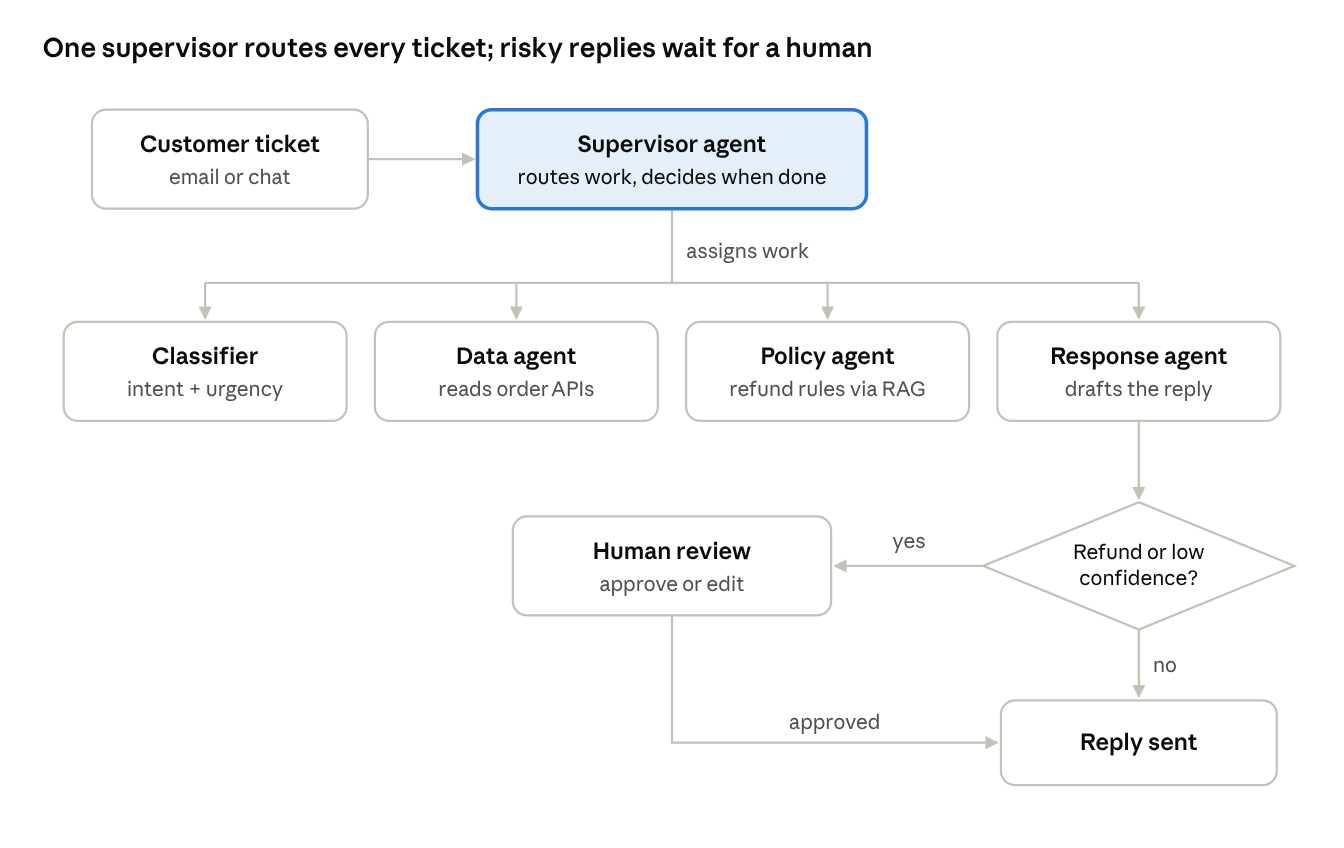
Split the work into four small agents, coordinated by a supervisor. Each agent has one job and only the tools it needs.
Architecture overview
- Supervisor agent: reads the ticket, decides which agent should act next, and decides when the job is done.
- Classifier agent: detects intent (order status, refund, technical issue, complaint) and urgency.
- Data agent: calls the order and customer APIs to fetch real facts. It never writes a reply.
- Policy agent: checks the refund and return rules from the knowledge base (RAG over policy documents).
- Response agent: drafts the final reply in the brand's tone.
- Human-in-the-loop gate: any refund above a set amount, or any low-confidence answer, goes to a human for approval.
Tools used
| Layer | Tool | Why |
| Orchestration | LangGraph | Clear state graph, easy retries, built-in checkpoints |
| LLMs | A large model for the supervisor, a small fast model for classification | Saves cost on simple steps |
| Knowledge base | Vector database + policy documents | Answers based on real rules, not guesses |
| Backend | FastAPI + Redis queue | Handles ticket bursts without timeouts |
| Monitoring | LangSmith (or any tracing tool) | See every agent step in production |
Key decisions
- Supervisor pattern over free-for-all chat between agents. Agents talking freely to each other create loops. A supervisor keeps control in one place.
- Read and write tools are separated. Agents can only read data. Write actions like issuing a refund run through one controlled function, and only after approval.
- Different model sizes for different jobs. Classification does not need the most expensive model.
Step-by-Step: Building It with LangGraph
Below is a simplified version of the core flow in Python. In this version, the supervisor's routing is written as small decision functions. That keeps it fast and predictable. You can swap in an LLM-based supervisor later for more complex cases.
Step 1: Define the shared state
Every agent reads from and writes to one shared state object. This is what makes the system easy to debug: you can see exactly what each agent changed.
from typing import TypedDict
from pydantic import BaseModel
from langgraph.graph import StateGraph, START, END
from langgraph.checkpoint.memory import MemorySaver

class TicketState(TypedDict, total=False):
    ticket: str
    intent: str
    confidence: float
    order_data: dict
    policy: str
    reply: str
Step 2: Build small, focused agents
Each agent is just a function that does one job. The classifier uses a small, cheap model with structured output so you always get clean JSON.
class Intent(BaseModel):
    intent: str        # order_status | refund | technical | complaint
    confidence: float  # 0.0 to 1.0

def classifier_agent(state: TicketState):
    result = small_llm.with_structured_output(Intent).invoke(
        f"Classify this support ticket:\n{state['ticket']}"
    )
    return {"intent": result.intent, "confidence": result.confidence}

def data_agent(state: TicketState):
    order_id = extract_order_id(state["ticket"])
    return {"order_data": orders_api.get(order_id)}  # read-only

def policy_agent(state: TicketState):
    docs = policy_store.similarity_search(state["ticket"], k=3)
    return {"policy": "\n".join(d.page_content for d in docs)}
Step 3: Add the supervisor's routing rules
def route_after_classify(state: TicketState):
    if state["intent"] in ("order_status", "refund"):
        return "data_agent"
    return "response_agent"

def needs_review(state: TicketState):
    if state["confidence"] < 0.75 or state["intent"] == "refund":
        return "human_review"
    return END
Step 4: Wire the graph and add human approval
graph = StateGraph(TicketState)
graph.add_node("classifier", classifier_agent)
graph.add_node("data_agent", data_agent)
graph.add_node("policy_agent", policy_agent)
graph.add_node("response_agent", response_agent)
graph.add_node("human_review", human_review)

graph.add_edge(START, "classifier")
graph.add_conditional_edges("classifier", route_after_classify)
graph.add_edge("data_agent", "policy_agent")
graph.add_edge("policy_agent", "response_agent")
graph.add_conditional_edges("response_agent", needs_review)
graph.add_edge("human_review", END)

app = graph.compile(
    checkpointer=MemorySaver(),
    interrupt_before=["human_review"],  # pause for a human
)
interrupt_before pauses the graph and saves its state. A team member reviews the draft in the dashboard, approves or edits it, and the graph resumes from the same point. In production, replace MemorySaver with a database-backed checkpointer such as Postgres.
Step 5: Trace every step
Turn on tracing from day one. When a reply is wrong, you open the trace and see exactly which agent made the bad call. This single habit saves more debugging hours than anything else.
What Breaks in Production (and How to Fix It)
Note on the numbers: the figures in this section and the results table are illustrative examples for the scenario above, not audited results from a specific client. Your own numbers will depend on your ticket mix, models and infrastructure.
The demo works on day one. Production teaches you everything else. Here are the four biggest lessons.
1. Agents get stuck in loops
What happens: when agents can call each other freely, a confused data agent can keep asking the classifier to "re-check" the intent, and the classifier keeps sending it back. One ticket can burn through dozens of LLM calls.
Fix: move all routing to the supervisor and add a hard limit with LangGraph's recursion_limit. If a ticket hits the limit, it goes straight to a human. Loops drop to zero.
2. Costs grow faster than traffic
What happens: every agent uses the largest model, and the monthly LLM bill ends up far higher than planned.
Fix: move classification and routing to a small model and cache policy lookups for repeated questions. In our example, LLM cost per ticket drops by about 60% with no visible drop in answer quality.
3. The AI promises refunds it should not
What happens: the response agent tells a customer their refund is "approved" when the policy does not allow it.
Fix: two changes. First, agents can only read data; refunds go through one controlled function. Second, every refund reply passes the human approval gate. This turns a risky bug into a security and compliance improvement.
4. Slow responses during peak hours
What happens: during a sale, ticket volume spikes and API calls start timing out.
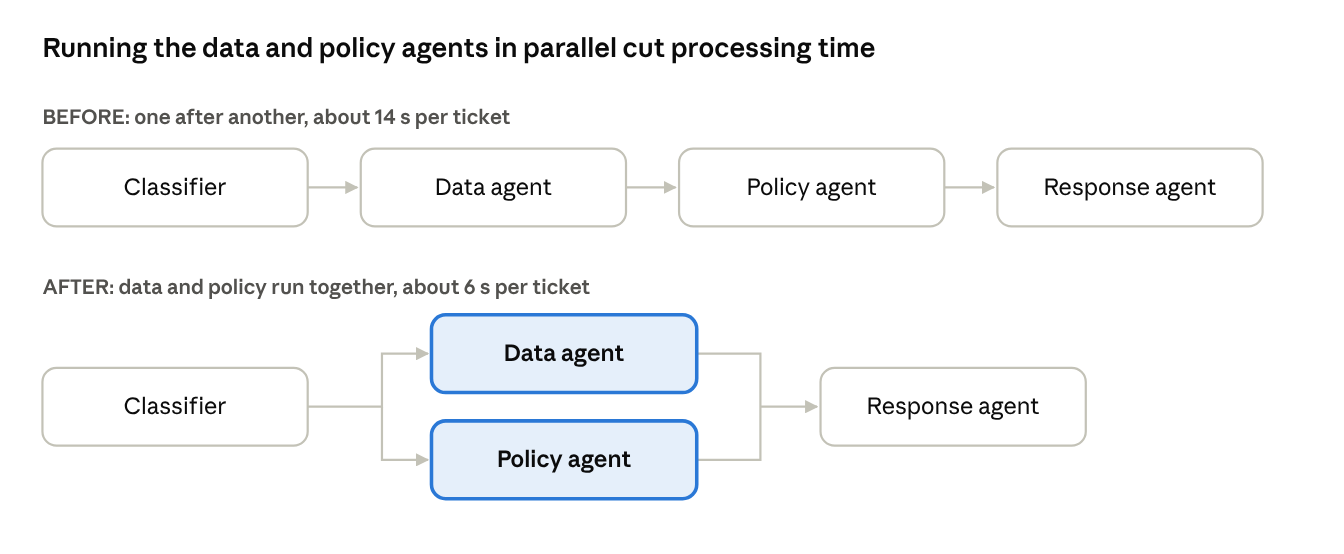
Fix: put tickets in a Redis queue and run the data agent and policy agent in parallel instead of one after another. In our example, average processing time falls from about 14 seconds to about 6 seconds per ticket.
Example results after 8 weeks
| Metric | Before | After |
| Average first response time | ~4 hours | Under 2 minutes |
| Tickets resolved without a human | 0% | ~55% |
| LLM cost per ticket | Baseline | ~60% lower |
| Team time on repetitive tickets | Most of the day | Under 2 hours a day |
The biggest win is not speed. It is that the support team spends its time on the hard, human problems, and customers get consistent answers.
When You Should NOT Use Multi-Agent Systems
Multi-agent AI is powerful, but it is not always the right answer. Skip it when:
- The task is one simple step. An FAQ bot does not need five agents. One well-written prompt is cheaper and faster.
- You have no clean APIs or data. Agents are only as good as the tools they can call. Fix your data first.
- Every answer must be 100% deterministic. For tax calculations or legal rules, use normal code and let AI handle only the language part.
A good rule: start with one agent. Split it into more agents only when you can name the specific job the new agent will own.
FAQ
What is the difference between agentic AI and generative AI?
Generative AI creates content, like text or images. Agentic AI uses that ability to plan and take actions toward a goal, such as fetching data or updating a system.
Which framework is best for multi-agent systems?
LangGraph, CrewAI and Microsoft AutoGen are popular choices. LangGraph stands out for its clear control flow and built-in human approval support.
Are AI agents safe to use with real customer data?
Yes, with guardrails: read-only tools by default, human approval for sensitive actions, and full tracing of every step. Testing matters too - see our guide on how to QA an AI chatbot.
Conclusion
Agentic AI works in production when you keep each agent small, keep control in one supervisor, separate reading from acting, and keep a human in the loop for risky decisions. Start simple, trace everything, and grow only where the data shows a need.
Key takeaway: small agents, one supervisor, read-only tools by default, and a human gate for risky actions. That combination is what turns a multi-agent demo into a system you can trust in production.
Sources: Gartner, Top Strategic Technology Trends for 2026; CompTIA, IT Industry Outlook 2026.
If your team handles high volumes of repetitive requests - support tickets, invoice processing, lead qualification, internal IT helpdesk - and wants AI that takes action safely, Logic Providers can help you design and ship it. Explore our AI agent and workflow automation services or see how we approach custom AI integration. The business benefit: faster responses for customers, lower operating cost, and a team that spends its time on work that actually needs a human.